
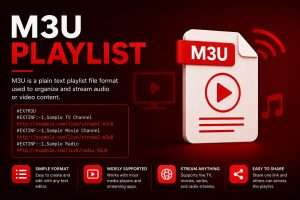
The foundation of modern decentralized streaming relies on a structured metadata format known as the IPTV Playlist. Most commonly deployed as an M3U (MP3 URL) or M3U8 file, this document acts as the critical bridge between a media player and a remote content delivery network (CDN). Rather than housing the video data itself, an M3U IPTV playlist contains the explicit routing instructions, server addresses, and encryption tokens required for your device to locate and decode live media streams.
The Syntax and Structure of an M3U IPTV Playlist
To understand how a playlist commands your streaming hardware, you must look at its underlying syntax. A professional-grade playlist uses specific directives to organize thousands of live endpoints.
Raw M3U vs. Xtream Codes API
While uploading a raw M3U file was the industry standard for years, modern enterprise networks have largely transitioned to the Xtream Codes API method. Understanding the difference is vital for optimizing device performance.
When you load a raw M3U file containing 20,000+ channels, your device (such as a Firestick) must store the entire text document in its active RAM. This heavy memory load frequently causes application crashes. The Xtream Codes API solves this by breaking the connection string into three parts: Portal URL, Username, and Password. Instead of downloading the massive playlist file locally, the API queries the remote server dynamically, requesting only the specific channel group you are actively browsing. This drastically reduces CPU strain and eliminates interface lag.
Infrastructure: Premium vs. Public Scraping
The primary architectural difference between a free playlist and a premium provider lies in server authorization and edge-node availability. Free lists aggregate publicly exposed stream links. Because these links lack token-based security, thousands of users connect simultaneously, overwhelming the host server and causing the feed to drop (often within hours).
A premium IPTV playlist operates on a closed ecosystem. When a user inputs their playlist credentials, the server authenticates the connection and routes the stream through a localized, load-balanced CDN. This infrastructure guarantees high uptime and stable 4K delivery by preventing server overload.
Related Technical Documentation
Expand your understanding of streaming topologies by exploring our complete engineering guides:
Frequently Asked Questions: Technical Parsing
What is an M3U8 Playlist?
An M3U8 file is identical in function to a standard M3U playlist, but it explicitly uses UTF-8 character encoding. This is mandatory for global services, as it allows the software to properly render complex characters in Arabic, Cyrillic, or Asian languages within the Electronic Program Guide (EPG).
Why does my IPTV playlist fail to update?
If your channel list or EPG metadata is not updating, your application’s internal cache is likely full. Navigate to your device settings and clear the application cache to force a fresh handshake with our authentication server.
Can a playlist execute malicious code?
A standard M3U file is purely a text document containing media URIs; it cannot natively execute code. However, you should always ensure your streaming application is downloaded from an official repository (like the Google Play Store or Apple App Store) to prevent third-party apps from scraping your device data.